

Article
What is the Microsoft Power Platform: Power Apps & Power Automate and more..
Moonlight 365 explains what the Power Platform can do for Microsoft 365 users who want automation and dashboards.
Invest More in your Microsoft 365 Platform
If your organization is invested in the Microsoft platform, you already know there's an ocean of tools at your disposal. Exciting, but yeah, a little overwhelming. Throughout your Microsoft 365 journey, you've probably heard terms like "Power Platform", "Power Apps", "Power Automate", and "Power BI". And as the name suggests, these tools bring some serious power to help automate and modernize your business operations. Let's break down what each of these terms means and share a few examples of how your company could actually use them.
The Microsoft Power Platform
Let’s start with Power Platform: this isn't a tool itself, but rather the whole suite that includes Power Apps, Power Automate, and more. (There are a few others like Power BI, Power Pages, and Copilot Studio. We'll save those for a future blog.)

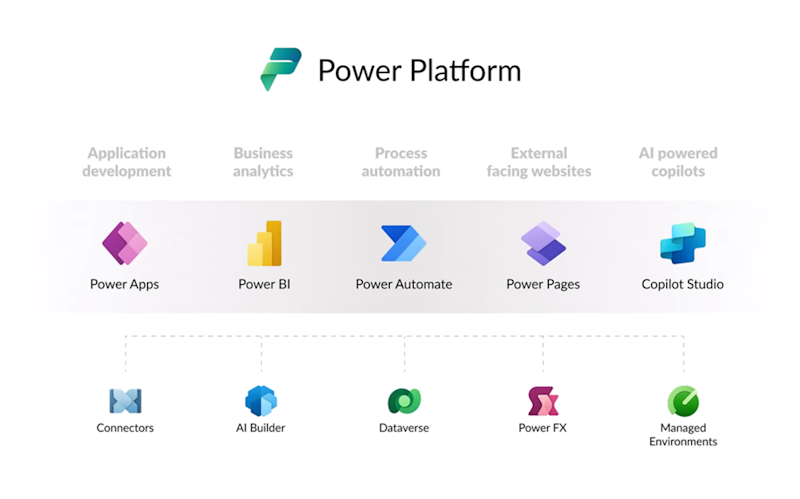
Power Apps lets you create apps securely inside your Microsoft 365 tenant using various connectors. You can build apps that connect to SharePoint sites, OneDrive files, Teams chats, Planner notifications, and essentially anything in Microsoft 365. For example, I want to manage all HR requests in a single dashboard. With Power Apps I can view time-off requests, compare it to the employee’s available time off, and respond with a yes or no all in the same interface. Thus, consolidating 3 applications into one dashboard.
The best part? Power Apps is low-code. That means building basic apps isn't too hard, but the capabilities are broad. Experts like Moonlight 365 have built full enterprise solutions with Power Apps, including SharePoint Dashboards (search, upload, edit, find), End-user Request forms, Task tracking dashboards (for managers and employees alike), and more.
Power Automate is your go-to for workflow automation inside Microsoft 365. Like Power Apps, it comes with connectors out of the box, so you can automate processes in SharePoint, Outlook, Teams, OneDrive, and beyond. Power Automate is also low-code for basic flows, but it can get as complex as your automation needs require. For example, one can notify a specific user 90 days prior to contract’s expiration. A different workflow can create a SharePoint site which includes security access, metadata, and folders.
Moonlight 365 has built some pretty complex workflows to help firms and businesses automate tiresome and repetitive tasks that benefit both users and managers in their day-to-day work.
Power Platform explained in a Video
Understanding the Power Platform can provide a way for management to execute cost-effective workflows and applications that enhance worker productivity without the high cost of AI tokens. To better understand the Power Platform suite, the video author Dani Kahli provides 11 minutes of clear, concise explanation for the beginner. Click here to watch his video.